
Sheru Bhai Game for PC: What the Google Play Games on PC Page Says
Google Play shows a Google Play Games on PC page for Sheru Bhai Life Simulator Game by Skorax, with an “Install on Windows” section. It says the Google Play Games on PC app is required to install the game on Windows. We have not tested it; this page repeats what Google's own pages say, as of 2026-11-25.
Last checked
What the Google Play Games on PC page says
The Skorax game's Android page says “Available on: Android, Windows*” and shows an “Install on Windows” button. Google Play also has a separate Google Play Games on PC page for the game, which we read on 2026-11-25 (US view). Open the Google Play Games on PC page.
- It says: “Google Play Games on PC is required to install this game on Windows.”
- Its PC section is headed “Play this game on your Windows PC with Google Play Games” and lists five points: Official Google experience, Bigger screen, Level up with improved controls, Seamless sync across devices*, and Earn Google Play Points. The footnote reads “*Might not be available for this game”.
- Labels on the page: Contains ads, Teen (Violence, Blood), Simulation, “Powered by Intel® technology”, 1M+ downloads, and “Updated on Nov 24, 2026”.
- Data safety on the PC page repeats the two lines from the Android page: “No data shared with third parties” and “No data collected”.
What your PC needs to run it
The PC page lists minimum requirements, and Google's help page for Google Play Games on PC lists the same ones. We found no separate requirements list for this one game. Google Play Help: check if your PC can run Google Play Games on PC.
- OS: Windows 10 (v2004)
- Storage: solid state drive (SSD) with 10 GB of available storage space
- Memory: 8 GB of RAM
- Graphics: Intel® UHD Graphics 630 GPU or comparable
- Processor: 4 CPU physical cores
- Other: a Windows admin account, and hardware virtualization must be turned on
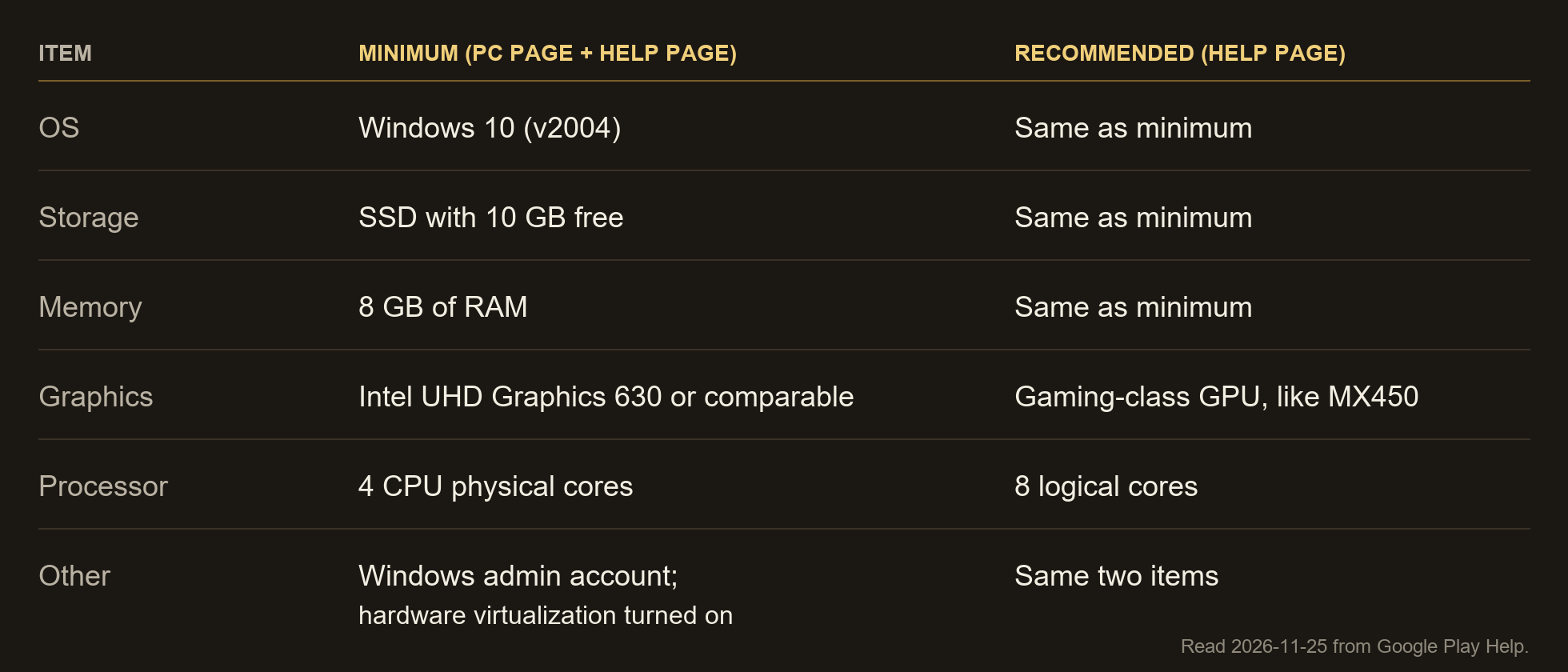
The help page also has a “Recommended for better gameplay performance” column: a gaming-class GPU, like Nvidia GeForce MX450, and 8 logical cores. It says: “If your PC doesn’t meet the minimum requirements, some games might not work well.”
Two installation tips from the same page: “During installation, you might be asked to turn on Windows Hypervisor Platform.” and “Make sure the SSD is set up as the main drive.”
Account and country rules
The help page says that to use Google Play Games on PC you need to use a personal Google Account (“Some countries or regions may need to check your age”) and have your Play country set in a supported country or region.
It lists the supported countries, including the United States, Australia, India and the United Kingdom, and says “More countries or regions will be available soon.” Look for your own country on the help page before you plan an install.
The game's own Play description says “No sign-up and no account.” That sentence is about the game; the Google Account rule above is about the Google Play Games on PC app. We have not installed it, so we have not seen how the two fit together.
How the PC page differs from the phone page
We read both pages on 2026-11-25, in the US view. Most lines match; the rating line does not.
- Rating: the PC page shows 4.4 stars from 10 reviews; the Android page shows 4.8 stars from 15.7K reviews. Neither page says why they differ.
- Downloads: both show 1M+.
- Content rating (US view): both show Teen, Violence, Blood.
- Updated on: both show Nov 24, 2026.
The Australian Play page shows a different content rating from the US one; the comparison of what each Play listing declares keeps each region's value apart.
What we did not test
We did not install Google Play Games on PC and did not run the game on Windows. So we cannot say how it performs, whether your PC passes the requirements check, how keyboard and mouse controls feel, or whether “Seamless sync across devices” works for this game; the page itself notes it “Might not be available for this game”.
The help page names Windows 10 (v2004) as the minimum; we do not claim anything about other Windows versions.
This guide links only to official Google Play pages. It does not link installers, APK files or mirror sites.
How we checked
On 2026-11-25 we opened three Google pages in the US view: the game's Google Play Games on PC page, its Android page and the Google Play Help page on PC requirements. We copied the wording and the figures from them and compared the two game pages line by line. Nothing here comes from running the game.
To tell the three same-name Android apps apart, use the package ID checker on the home page. For what the Skorax game lets you do once it runs, read the gameplay guide to Sheru Bhai Game.
Questions about Sheru Bhai Game on PC
Can you play Sheru Bhai Game on PC?
Google Play has a Google Play Games on PC page for it with an “Install on Windows” section, and says Google Play Games on PC is required to install the game on Windows. We have not tested it, so check the requirements and the country list first.
What does my PC need to run Sheru Bhai Game?
The listed minimum is Windows 10 (v2004), an SSD with 10 GB free, 8 GB of RAM, an Intel UHD Graphics 630 GPU or comparable, 4 CPU physical cores, a Windows admin account and hardware virtualization turned on.
Do I need a Google account to play on PC?
Google's help page says Google Play Games on PC needs a personal Google Account and a Play country set in a supported country or region. The game's Play description separately says “No sign-up and no account.”
Found something wrong or out of date? Tell us on the contact page.